API Documentation
Authentication Token 
Create Token
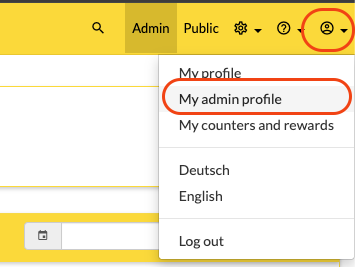
Access token can be created in the Beeple App in Admin Profile area via API tokens. Follow these steps to create one.
Go to Admin section
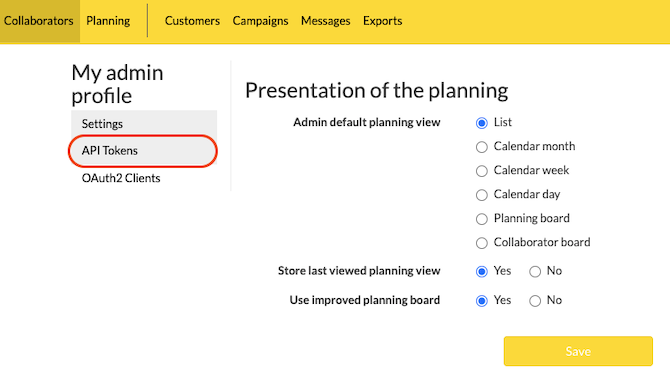
Go to API tokens
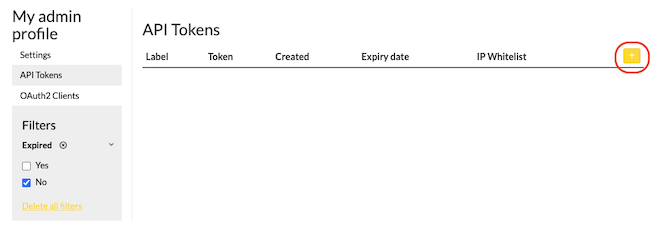
Add token
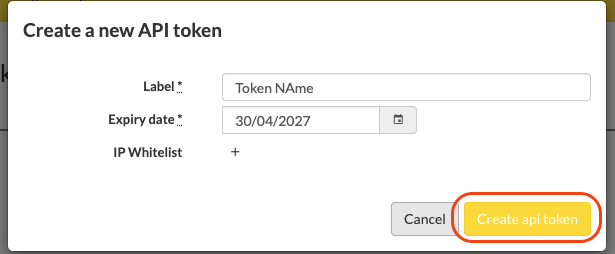
Create token
Receive created token
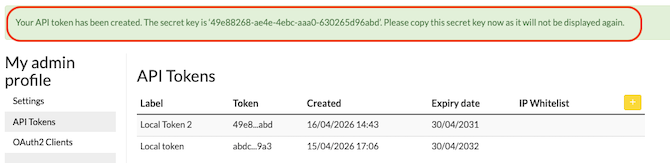
Use it in the request as a header
Token: 'my-generated-token'
Legacy: Create Token via API 
Create TokenPOST/api/v1/authenticate
This method has been deprecated. Please generate your API token from the ‘My admin profile’ page of your API user as described above. For more info please contact support@beeple.eu.
Security recommendations:
- Create a dedicated API user with only the access rights needed for the integration (eg read only or only for the data it needs to touch)
- Use a relatively short expiry date (eg one month) and refresh tokens automatically in background via this API: Refreshing a token
- If possible use a whitelist of IP addresses to limit access to where your API can be called from
The response contains more fields than those documented here. Consider those as not usable, as we can remove them anytime.
Example URI
Headers
Content-Type: application/json
Application-Id: application id (optional)
Application-Secret: application secret (optional)
Body
{
  "session": {
    "email": "example@example.org",
    "password": "averystr0ngp@ssword",
    "display": "Example API",
    "expiry_date": "2024-01-15"
  }
}
Schema
{
  "$schema": "http://json-schema.org/draft-04/schema#",
  "type": "object",
  "properties": {
    "session": {
      "type": "object",
      "properties": {
        "email": {
          "type": "string",
          "description": "The email of the user to login"
        },
        "password": {
          "type": "string",
          "description": "The password of the user to login"
        },
        "display": {
          "type": "string",
          "description": "A value to identify the request on Application"
        },
        "expiry_date": {
          "type": "string",
          "description": "An expiry date (YYYY-MM-DD) for a token"
        }
      },
      "required": [
        "email",
        "password",
        "display",
        "expiry_date"
      ],
      "description": "Group info"
    }
  }
}200Headers
Content-Type: application/jsonBody
{
  "token": "a-very-long-token"
}
Schema
{
  "$schema": "http://json-schema.org/draft-04/schema#",
  "type": "object",
  "properties": {
    "token": {
      "type": "string",
      "description": "The Token to use in the authentication"
    }
  },
  "required": [
    "token"
  ]
}
Refreshing a token 
Refresh tokenPOST/api/v1/refresh-token
Use this API to refresh a token for use in the management API’s.
The response contains more fields than those documented here. Consider those as not usable, as we can remove them anytime.
The label, whitelist IP and all other information (except the token and expiry date) will be reused from the token used to make this call.
Example URI
Headers
Content-Type: application/json
Token: The existing token
Body
{
  "session": {
    "expiry_date": "2024-01-15"
  }
}
Schema
{
  "$schema": "http://json-schema.org/draft-04/schema#",
  "type": "object",
  "properties": {
    "session": {
      "type": "object",
      "properties": {
        "expiry_date": {
          "type": "string",
          "description": "An expiry date (YYYY-MM-DD) for a token"
        }
      },
      "required": [
        "expiry_date"
      ],
      "description": "Refresh info"
    }
  }
}200Headers
Content-Type: application/jsonBody
{
  "token": "a-very-long-token"
}
Schema
{
  "$schema": "http://json-schema.org/draft-04/schema#",
  "type": "object",
  "properties": {
    "token": {
      "type": "string",
      "description": "The Token to use in the authentication"
    }
  },
  "required": [
    "token"
  ]
}
Two-factor Authentication Creation 
Get OTP codePOST/api/v1/createotp
Use this API call to get your OTP code from your current login request in your mailbox.
To do this, first perform the POST from the authentication, so you have your login Token. Note: you have 300 seconds to complete the next step that is the validation of the OTP code
Example URI
Headers
Content-Type: application/json
Token: 98a72dd6-44e6-4624-8869-58f6f949e6c2200Headers
Content-Type: application/jsonBody
{
  "status": "A verification code was sent to your@email.address. This code expires in 300 seconds."
}
Schema
{
  "$schema": "http://json-schema.org/draft-04/schema#",
  "type": "object",
  "properties": {
    "status": {
      "type": "string",
      "description": "response from system with OTP code in your mailbox"
    }
  }
}
Two-factor Authentication Validation 
Valid OTP codePOST/api/v1/validateotp
Now we send the OTP code that you received in your mailbox.
Example URI
Headers
Content-Type: application/json
Token: 98a72dd6-44e6-4624-8869-58f6f949e6c2
Body
{
  "session": {
    "otp_secret_key": "123456"
  }
}
Schema
{
  "$schema": "http://json-schema.org/draft-04/schema#",
  "type": "object",
  "properties": {
    "session": {
      "type": "object",
      "properties": {
        "otp_secret_key": {
          "type": "string",
          "description": "send in OTP code for validation"
        }
      },
      "required": [
        "otp_secret_key"
      ]
    }
  }
}200Headers
Content-Type: application/jsonBody
{
  "success": "true"
}
Schema
{
  "$schema": "http://json-schema.org/draft-04/schema#",
  "type": "object",
  "properties": {
    "success": {
      "type": "string",
      "description": "response from system mentioning if the OTP code is correct"
    }
  }
}400Headers
Content-Type: application/jsonBody
{
  "success": "false",
  "message": "Invalid verification code"
}
Schema
{
  "$schema": "http://json-schema.org/draft-04/schema#",
  "type": "object",
  "properties": {
    "success": {
      "type": "string"
    },
    "message": {
      "type": "string"
    }
  }
}
OAuth 
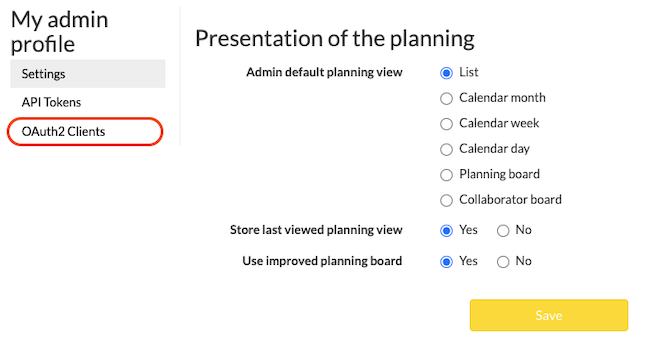
In case you want to use OAuth. The token can be created in the admin section under the OAuth2 Clients
Go to OAuth2 Clients
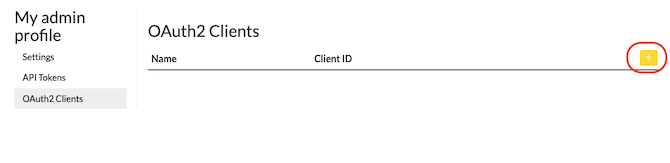
Add token
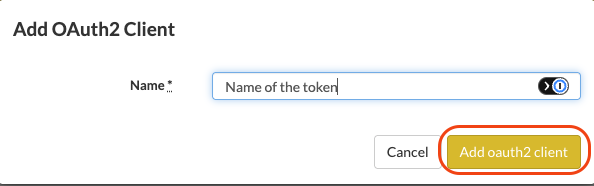
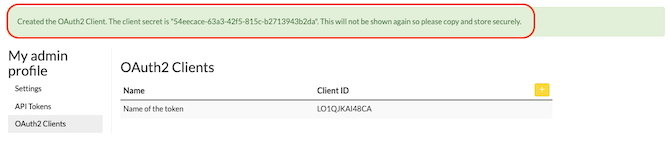
Create OAuth token
Receive the client ID and secret
Create JWT 
Create JWTPOST/api/v1/oauth/token
For API requests to Data Management it is necessary to generate a JSON Web Token.
Use the client_id and client_secret generated in the admin UI.
This endpoint can be also used to refresh the JWT.
Example URI
Headers
Content-Type: application/jsonBody
{
  "grant_type": "client_credentials",
  "client_id": "RCO9NFG2IUCW",
  "client_secret": "873cd90a-7636-46b5-88dc-aa11354c0dc4"
}
Schema
{
  "$schema": "http://json-schema.org/draft-04/schema#",
  "type": "object",
  "properties": {
    "grant_type": {
      "type": "string",
      "description": "Always 'client_credentials'"
    },
    "client_id": {
      "type": "string",
      "description": "Generated client ID from the admin section"
    },
    "client_secret": {
      "type": "string",
      "description": "Generated secret from the admin section"
    }
  },
  "required": [
    "grant_type",
    "client_id",
    "client_secret"
  ]
}200Headers
Content-Type: application/jsonBody
{
  "access_token": "eyJhbGciOiJIUzI1NiJ9.eyJzdWIiOiJSQ085TkZHMklVQ1cvMTc4OSIsImV4cCI6MTc3NjI4MzA5OH0.njfNMAtzifC1iaGwqL2ExHX3aNIK2QtY1Zz6-xfizjk",
  "token_type": "Bearer",
  "expires_in": 3600
}
Schema
{
  "$schema": "http://json-schema.org/draft-04/schema#",
  "type": "object",
  "properties": {
    "access_token": {
      "type": "string",
      "description": "Generated JWT"
    },
    "token_type": {
      "type": "string",
      "description": "Always `Bearer`"
    },
    "expires_in": {
      "type": "number",
      "description": "Token lifetime in seconds, always one hour"
    }
  }
}401Headers
Content-Type: application/jsonUsing the JWT Token 
Authenticated API Request 
Make a RequestGET/path/to/some/resource/id
Use the generated JWT token in all subsequent API requests via the Authorization header.
Use the generated JWT token in API requests. Do not use the client ID or client secret from the admin UI.
Example URI
Headers
Content-Type: application/json
Authorization: Bearer eyJhbGciOiJIUzI1NiJ9.eyJzdWIiOiJMTzFRSktBSTQ4Q0EvNSIsImV4cCI6MTc3NjM0MzEzMn0.VhQdai4-j2GK4Ojz2LHXOYuAsspoXmqB72cHNX9Cpeo200Headers
Content-Type: application/json